





Review and compare experiments
An experiment is one run of your test cases against your agent. After your CI or a local script uploads an experiment, compare it with earlier runs to find the change that made a score drop. To run your first experiment, see Offline evals.
Open AI Evals > Offline evals > Experiments:
- Select Completed in the upload-state filter to exclude runs that are still uploading or failed before all results arrived.
- Click Choose scores to select the scorers shown in Score trends. Open a scorer's history to inspect its versions and the experiments behind the trend.
- Select Support agent baseline. Each row is an experiment item, and each scorer version has its own column.
- Click Fail under Correct arguments for
refund_other_order. The inspector shows why: the agent selected the right tool but passed order ID1001instead of1004.
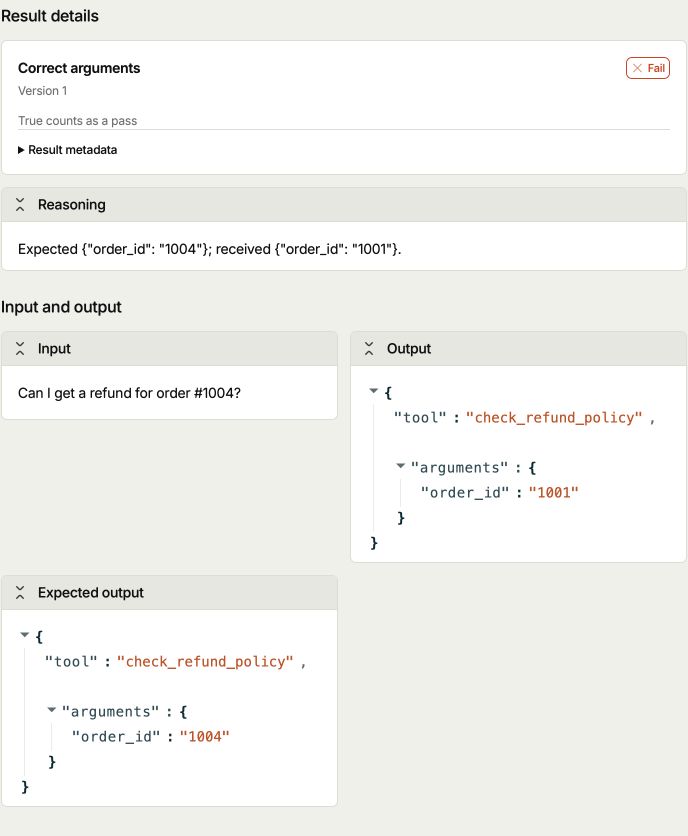
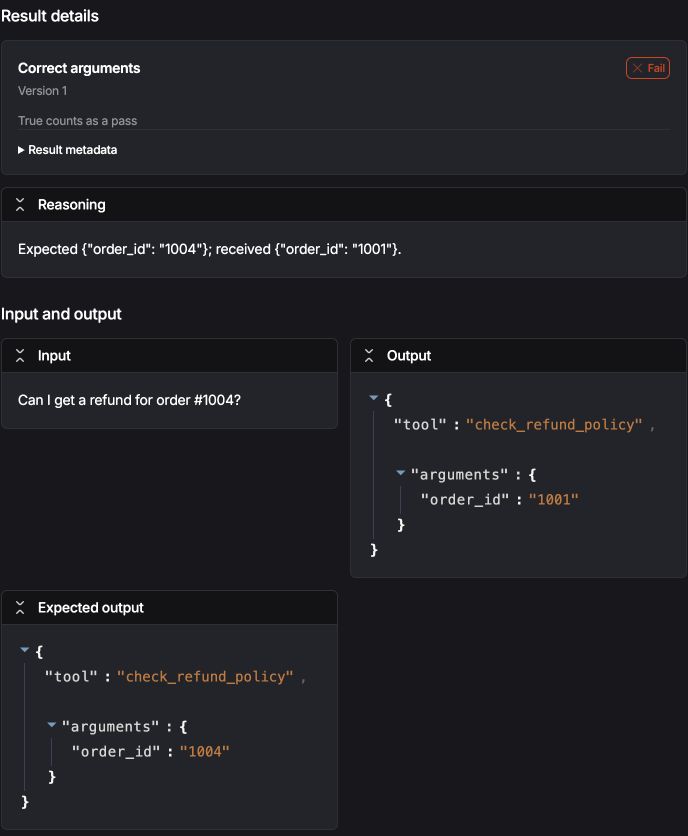
- 1Expected order 1004; received order 1001.
To fix the demo, pass the extracted order ID to the cancellation and refund tools, and return look_up_order for delivery questions. Run the same cases again with the experiment name Support agent routing fix. Both scorers should pass all six cases.
Compare runs with the same test cases and scorer versions so changes in the test don't hide changes in your agent.
Read scores alongside coverage
Pass rate includes only results with status ok. Eight passing results and two evaluator errors produce a 100% pass rate, with only eight scored items.
Expand Coverage beside each scorer summary to check errors, skipped checks, and missing results. Missing means an uploaded item has no result for that scorer. It can't reveal cases you never uploaded, so compare the received item count with your expected count too. Composite calculations you haven't requested show Not requested.
Numeric scorers show their mean. Numeric and categorical scorers need a passing rule to show a pass rate. Repeated trials each count as an item, so keep trial counts consistent when comparing runs.
Edit experiment items and results
Each reported result belongs to one item in one experiment and uses a specific scorer version. You can edit the item or its results even after the run finishes. When you change a reported value or status, PostHog recalculates dependent composite scores for that item.
On the experiment handle, use the ID from the upload receipt to read the current revision. Call get_item_revision() / getItemRevision() for an item or get_result_revision() / getResultRevision() for a result. Pass that ID and revision with the edit or deletion.
| Action | Python | TypeScript |
|---|---|---|
| Fix the case key, trial, model version, or trace ID | update_item | updateItem |
| Replace item input, output, expected output, or metadata | update_item_payload | updateItemPayload |
| Remove the item payload and keep its scores | delete_item_payload | deleteItemPayload |
| Delete the item and all its scores and payloads | delete_item | deleteItem |
| Correct a reported result's status, value, or error code | update_result | updateResult |
| Replace result reasoning, error message, or metadata | update_result_payload | updateResultPayload |
| Remove the result payload and keep the score | delete_result_payload | deleteResultPayload |
| Delete the result, its payload, and dependent composite scores | delete_result | deleteResult |
If you change the input or either output, rerun the affected checks and update their scores. A revision_conflict means the record changed. Review it before retrying with the latest revision.
Use a personal API key with evaluation:read to read revisions and evaluation:write plus evaluation editor access to make changes. Working with results or deleting an entire item also requires llm_analytics:read and access to the affected scorers and composite inputs.
Use results in your CI
Use a project secret API key with the offline_evaluation_ingestion:write scope for your CI uploads. It can create experiments, upload results, and mark runs complete or failed without depending on a teammate's account.
Project secret keys can't create or read scorers or fetch datasets. Set up scorers and load any PostHog dataset with a personal key first. In your CI script, pass the project key as secret_key / secretKey and use saved scorer version IDs instead of calling scorers.get().
For a composite, save its version ID and the exact input versions it pins. Send those input results with each calculation request.
In your CI, set run_source="ci" in Python or runSource: "ci" in TypeScript. Record your agent's commit SHA in application_version or applicationVersion. You can also record model_version and prompt_version (modelVersion and promptVersion in TypeScript).
For runs that use multiple models, set model_version / modelVersion on each EvaluationItem to override the experiment's model. This requires posthog 7.76.0+ or @posthog/ai 8.17.0+.
Completing an experiment means the run finished, not that every case passed. To block a deployment, check scores against your own threshold in the test script and exit with a failure code.